PS5 Controller Drifting? Try This Before Paying for a Repair
Nov 10th '26 7:52am:
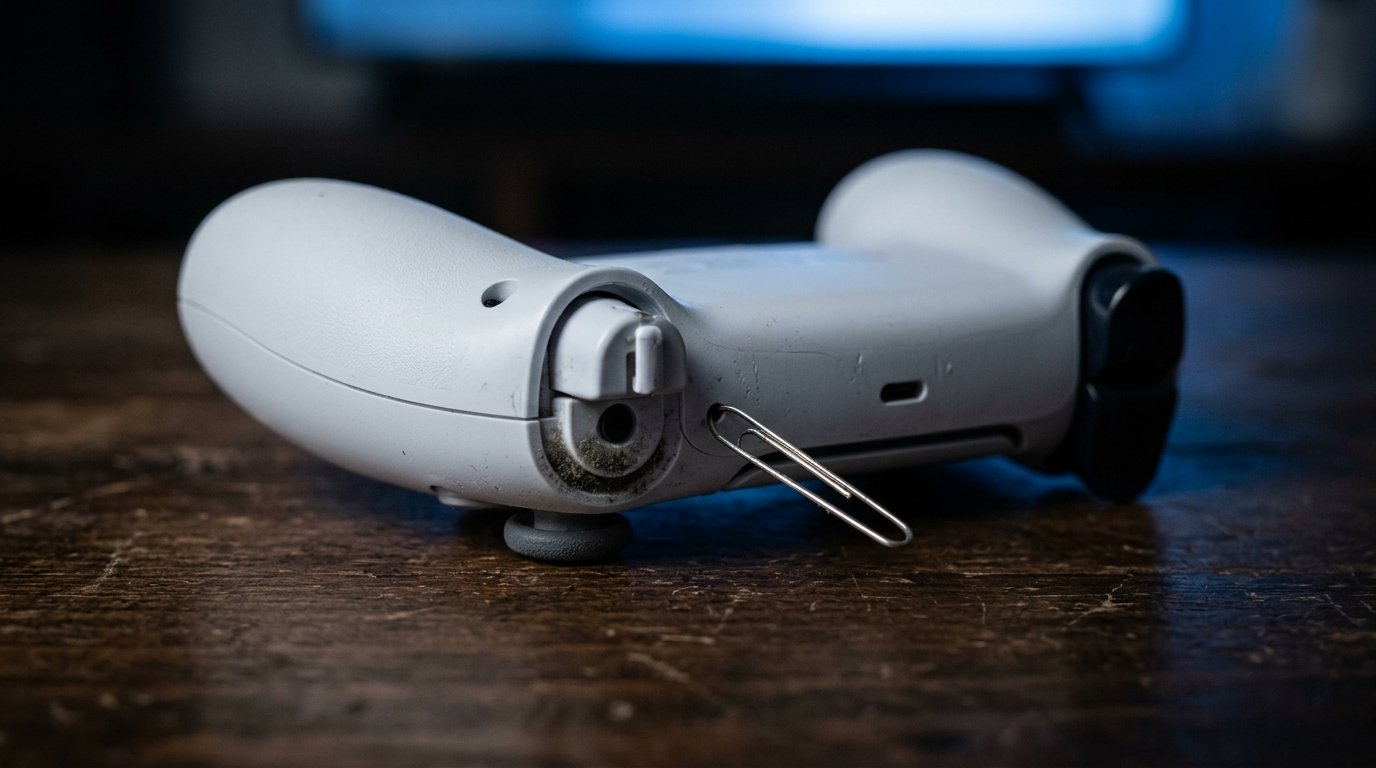
Search "how to fix PS5 stick drift" and sooner or later you'll land on a guide telling you to open an option called "Drift Correction" in the system settings. I went looking for that option. I couldn't find it in Sony's documentation, and the official DualSense troubleshooting page talks about something else: a reset button hidden in a small hole next to the Sony logo on the back of the controller.
Worth knowing before you follow any recipe from the internet, because almost everything that really helps with drift happens outside the settings screen.
## First, prove it's the controller
Sounds like a silly question. It isn't.
If your character only drifts in one game, the culprit may be that game's deadzone, and the controller is innocent. The cleanest test is on the PS5 home screen: put the controller down on a table, don't touch it, and see whether the cursor wanders. If it does, it's hardware. Try another controller for comparison and, while you're at it, plug yours in with a USB-C cable for a few minutes to take Bluetooth out of the picture.
If you have a PC nearby, open a browser gamepad tester and look at the axis values at rest. They should sit right at zero. If one insists on reading something like 0.07 with nobody touching it, you have your answer in numbers.
## The hole on the back
It's the only step Sony documents, so start here.
Turn the console off, unplug the USB cable from the controller, and find the hole next to the logo. With a pin or something similar, press and hold the button inside for at least 5 seconds. Then connect the controller by cable and let it pair again.
If the drift came from a scrambled calibration, it ends here. If it came from wear, it's back within days.
## Dust, grease and the easy case
When the drift comes and goes, or only pulls in one direction, suspect dirt around the base of the stick before you condemn the controller. Tilt the stick, blow compressed air into the gap, rotate it, repeat in the other directions. It's surprising what comes out of there.
For stuck-on residue, use a cotton swab very lightly dampened with isopropyl alcohol around the stick, and let it dry completely before plugging it back in. Never pour liquid on it. The word that matters is "lightly".
This fixes it for good when dirt was the real cause. When it wasn't, the problem comes back. Most of these fixes are temporary, and the reason is two sections down.
## Deadzone, the honest patch
Almost every modern game lets you adjust the stick deadzone in its controller options. It's a central area where the game ignores movement, and raising it a little at a time makes the camera stop drifting. It doesn't fix anything: it hides the drift.
You pay for it in precision. In a shooter, an oversized deadzone makes the first millimetre of movement "not exist", and your aim starts jumping instead of gliding. Raise it in small steps and stop the moment the drift disappears, not a bit after.
Treat it as a temporary workaround, never as a diagnosis.
## When the problem is the potentiometer
Here's the point almost nobody spells out: if the cause is wear, there's no trick. iFixit's tests point to worn potentiometers, the input sensors inside the sticks, as the main cause of drift in the DualSense, and no cotton swab reaches in there. As a rule of thumb, if the drift comes back twice after cleaning and resetting, stop cleaning.
Three exits remain, each with its own price.
The first is the warranty. For drift that shows up within the period, the warranty is one year and the controller can be sent to Sony for service. In the European Union it's also worth checking what your country's law provides, since the legal guarantee can go beyond the commercial term. Keep your receipt and request service through the PlayStation support site before you think about opening the controller. Opening it complicates the conversation.
The second is the DualSense Edge, launched in early 2023, with stick modules that can be swapped. It's the long-term fix Sony itself offers, but it means paying for a controller around $200 to solve a $70-controller problem. It only makes sense if you want the Edge for other reasons too.
The third is replacing the modules in a standard DualSense. As far as I know, on that model the module is soldered to the board, so it's work for someone who already knows how to use a soldering iron, and one mistake can kill the controller for good. It pays off if you already have the tools and the controller is out of warranty. For a first-timer, not really.
By the way: if a guide tells you to go into settings and switch on "Drift Correction", ask which system version that appears in. I still haven't found it.