Screen Size vs Viewing Distance: The Gaming Setup Mistake Killing Your Reaction Time
Aug 15th '26 6:04pm:
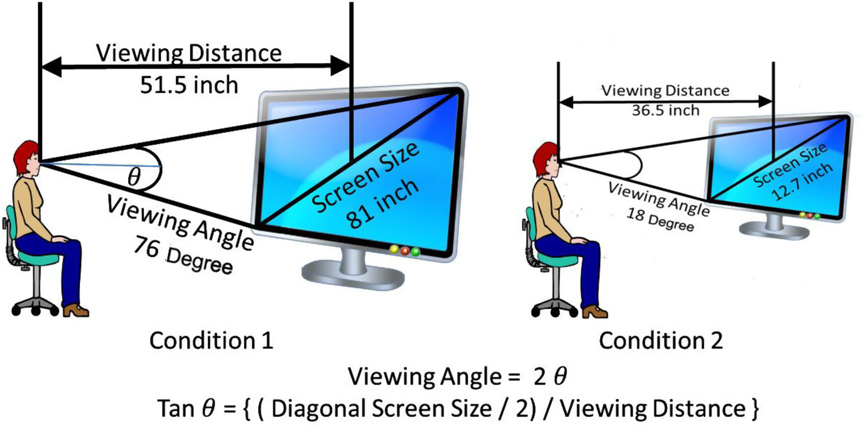
There's a scene that plays out in pretty much every serious gaming setup at some point. Someone swaps their 24 inch monitor for a 32, feels great about the upgrade for about a week, and then starts losing duels they used to win without thinking twice. It's not imagination. It's not rust. And it's definitely not the game suddenly getting harder overnight. It's the screen, or more precisely, the relationship between the screen and how far away you're actually sitting from it, a detail most people never think about while they argue for hours over refresh rates and panel response times.
## Bigger isn't automatically better
Worth clearing this one up first, because it trips up almost everyone. The thing that actually shapes how fast you react to what's happening on screen isn't the diagonal size printed on the box. It's the visual angle that screen takes up in your field of view, and that depends on size and distance together, not size alone. A 27 inch monitor sitting sixty centimeters from your face takes up, in practice, a wider angle than a 55 inch TV three meters across the room, even though the TV is physically much bigger. That's honestly why most competitive FPS players end up gravitating toward smaller monitors placed close, rather than big screens further back, even when they've got the space and the budget for something flashier.
But more angle isn't always better either. There's a sweet spot, and it's easy to overshoot it. A wider angle gives you more peripheral coverage, which helps you catch movement at the edges without turning your head every two seconds, and that's great, up to a point. Push past it and your eyes start needing to dart away from the center just to keep up with the edges, and reaction time, instead of improving, actually slows down. The commonly cited range sits around thirty to forty degrees of horizontal visual angle. Not a hard rule. Just a decent starting point.
Distance changes perceived sharpness too, and this one has a pretty concrete effect, like spotting an enemy camping at the far end of an open map. Sit closer and each pixel takes up more of your perception, which in theory helps you pick out small details. Up to a point, again. Get too close and you start seeing the pixel grid instead of a coherent image, and whatever sharpness you gained from proximity kind of cancels itself out, while your eyes end up working harder over a long session. Resolution plays into this alongside distance too, a 1440p panel viewed up close often reads clearer, practically speaking, than 4K viewed from across the room.
## It depends on what you're actually playing
None of this means big screens are bad, not remotely. It just means the right choice depends on the game and, honestly, on what you personally care about in that session. Competitive FPS rewards focus and clean reaction time without extra visual noise pulling your attention sideways, so smaller and closer tends to win there. Open world RPGs, sims, anything more cinematic where immersion matters as much as reflexes, or sometimes more — a bigger screen at a comfortable distance gives you a sense of scale and presence that a small monitor just can't fake. There isn't one ideal size. There's an ideal size for what you're playing and why you're playing it.
Something people almost never connect to performance, though it probably should get more attention, is fatigue over a long session. Sitting too close to a large screen forces your eye muscles into a lot more accommodation work, and that wears you down slowly, quietly, to the point where your reactions start degrading around hour two or three and you don't really notice why. Add the neck into it. If you're constantly turning your head to track action happening at the edges, that's real physical fatigue stacking up, the kind that shows up later as slower reads and worse calls in exactly the moments that matter most.
## A rough starting point, not a rulebook
For anyone who wants something to actually go by instead of guessing, there are rough industry approximations tying size to distance in a way that's reasonably reliable. Monitors between 24 and 27 inches tend to work well somewhere between fifty and seventy centimeters away. For TVs used as a main gaming screen, the recommended distance scales up with size, and one simple reference is dividing the diagonal in inches by twenty to get an approximate distance in meters, then nudging it based on whether you're chasing reaction time or immersion. It's not exact science. Eyes and preferences vary a lot from person to person, in my experience more than people expect. But it's a decent baseline, better than picking a setup off whatever looked most impressive on a store shelf.
So that upgrade that seemed obvious, trading the small screen for the big one, might be exactly why you're playing worse now than you were before. Might be worth looking at your distance before you look at specs on the next monitor you're eyeing.